
millie reyes
"It’s an excellent app. I 100% recommend it. I’ve never had any problems with it, and my clients receive the messages immediately after their appointments are created... I definitely recommend it 👌."
Try Happoin free for 15 days, no credit card needed.
Know why thousands of people trust Happoin to manage their business appointments
 Verified Google Play Reviews
"It’s an excellent app. I 100% recommend it. I’ve never had any problems with it, and my clients receive the messages immediately after their appointments are created... I definitely recommend it 👌."

"Da quando uso questa app ho più tempo libero da dedicare alla formazione, alla gestione delle attività aziendali o semplicemente per riposarmi e godermi il tempo libero. Sono davvero molto soddisfatta..."

"A great option for those of us who manage appointments. That way, we never forget to schedule or follow up."

"I love that there are so many options for customizing notification messages. The chatbot can also be customized. I love that the messages are sent from my own number. I think the calendar could be mo..."

"It has made it easier for me not to lose clients and to manage my appointment times effectively."

"Excellent app and great support from the technical team. They’re always ready to help answer your questions and solve any issues. I highly recommend it for your barbershop business. 10/10!"

"Excellent app and professional service. I highly recommend it."

"I’m really excited: my sales have increased. Technical support is fantastic, always available to help with any questions. I recommend it 100%."

"Excellent service. Easy to use."

"Excellent. It helps me a lot."

"Excellent app! There are a few things they could improve, but overall it's very good. I highly recommend it, and as a bonus, my patients are happy to receive automatic reminders and be able to make an..."

"I really like it, very practical, highly recommended"

"It really simplifies things like scheduling shifts, notifications, etc. It's easy to use and has excellent technical support."

"I've been using the app for several months and I found it wonderful for my business. I give it the highest rating. Also, importantly, the person in charge of answering any questions we might have is s..."

"Excellent app and the prices aren't outrageous, I really liked it!"

"Excellent. I've been using it for my beauty center, and it's freed me up from scheduling and confirming my patients' appointments and organizing my team. I highly recommend it."

"It’s a super useful app, really good—I highly recommend it. The support team is always attentive with any questions. I truly recommend it 100%."

"I’ve been using the app for a little while now, and honestly, it really makes work life much easier… Plus, if you ever have a problem, they offer WhatsApp support to answer all your questions, and the..."

"Very good app, I schedule in a practical way and with the reminders I don't miss appointments."

"We recently changed our Overnight Stay and Agenda system for the entire center. The implementation, follow-up, and assistance have always been excellent. Today, we manage the entire agenda with this s..."

"Very good app, it manages appointments, notifications, etc. very well. My clients are very happy. Congratulations."

"WhatsApp appointment reminders from the same number your clients know are a great help to your business. I have the app installed on my mobile phone (iPhone) and tablet, and they work perfectly. Custo..."

"Excellent"

"Highly recommended and helpful. I have a dog grooming business, and it helps me a lot with my schedule."

"The app is super comprehensive. I love it for the automated management I do with my clients via WhatsApp, but it has many more features. And the service is very good and personalized. I recommend it!"
"Excellent system, the best, I would say highly recommended. Excellent price for small businesses that are just starting out, don't have a doubt, this is the best option."

"cool app"

"Easy to use, and the support team is very professional and quick to resolve issues. We love being able to customize the automatic messages sent to confirm appointments. Highly recommended. KINISI PHYS..."

"I like to send appointment reminders via WhatsApp and manage my appointments from the app on my cell phone."

"It has greatly optimized my time serving my clients, quickly and effectively scheduling my appointments. I really love it 👍👍"

"Excellent tool for scheduling appointments with accurate information. It allows you to view the list of created appointments in record time. Many congratulations."

"They're great. They make your life easier during reservations. And best of all, they're always attentive to any problems or questions you may have. Super fast."

"I love this app. Since I bought it, my work is much more organized, I save time, and it makes my life much easier every day."

"Excellent tool and easy to use"
"me encanta que hay mucho para personalizar los mensajes de notificaciones. también el chatbot se puede personalizar. amo que los mensajes se envían de mi número. creo que la agenda podría ser más amig..."
""
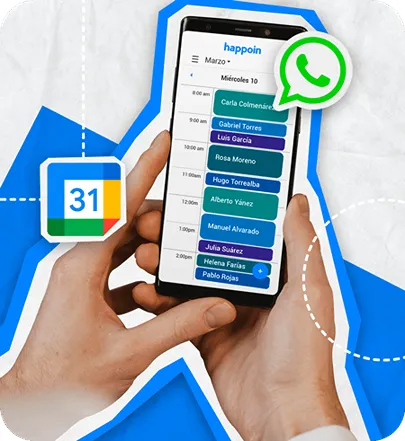
No more scheduling conflicts! Our app keeps your appointments and tasks synced with Google Calendar, ensuring everything is always up-to-date.
Boost your business by reducing no-shows and saving time. Connect your business WhatsApp to Google Calendar with a simple QR code scan for automated appointment reminders.
Automate your calendar with instant synchronization between our app and Google Calendar. Manage all your appointments and events from a single platform.
Enjoy a simple and efficient interface that makes managing your appointments a breeze.
You get the benefits through a system like Happoin. By integrating Google Calendar with Happoin, your appointments and events are updated in real time, and automatic reminders are sent via WhatsApp from your number. This way, you unify your calendar and eliminate the manual work of sending them one by one. You reduce errors and no-shows, and improve your calendar organization.
Whether it allows this depends on the software you use. Happoin does automatically send messages from your WhatsApp number. We recommend using WhatsApp Business to maintain a professional profile and differentiate personal messages from business ones.
There are systems that work with templates. In Happoin, both the message text and delivery times can be customized.
That will depend on what the app you use allows. With a scheduling tool like Happoin, you have six types of notifications you can schedule. Three of them can be custom-programmed to be sent before the appointment. Another can be scheduled to be sent one day after the appointment. Also, when you change or cancel the appointment, you can send unlimited notifications as many times as you edit or cancel the appointment, at no additional cost.
Managing Happoin and your Profile is easy and requires no installation or professional technical intervention. Additionally, we offer free video training with one of our technicians at the start of your subscription.
To integrate Google Calendar with WhatsApp, you need a third-party app like Happoin. It's very simple and takes just a few clicks. You must first be registered with Happoin. You can sign up for the free plan at the following link: Get Started for Free.
Then follow these simple steps:
In the Menu, go to Integrations.
Click the Add button.
Select Google Calendar.
Select the Google account with the calendar you want to integrate and click Continue.
Select the services Happoin can access and click Continue.
That's it! Your calendar is now connected and synced with your WhatsApp for real-time communication. Remember that if you have a team, you also have the option to sync it with them.
Whether you have a small business or a large enterprise, Happoin adapts to your needs
Automate your appointment schedule
This site uses cookies to offer you a better browsing experience.
Find out more on
how we use cookies.